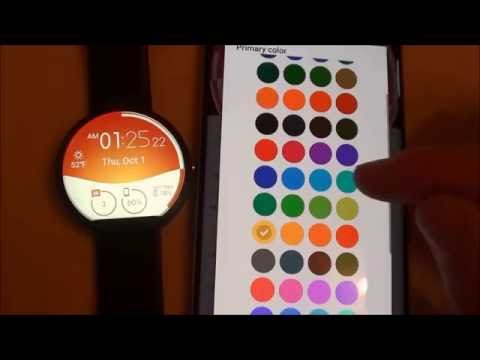

Morphing Watch Face
含廣告內容應用程式內購

star
1390則評論

適合所有人
info
1萬+
次下載

適合所有人
瞭解詳情


關於這個應用程式
Wear OS 變形錶盤!
★ 變形錶盤功能 ★
- 互動模式下的變形動畫
- 自訂設計顏色
- 日期和月份
- 手錶電量
- 手機電量(需手機應用)
- 天氣(需要手機應用程式)
錶盤設定位於手機的 Wear OS 應用程式中。
只需點擊錶盤預覽上方的齒輪圖標,即可打開設定介面!
★ 設定 ★
🔸Wear OS 2.X / 3.X / 4.X
- 選擇手錶和手機的設計顏色
- 設定心率刷新頻率
- 設定天氣刷新頻率
- 天氣單位
- 12/24 小時制
- 設定互動模式持續時間
- 選擇環境光模式(黑白和節能亮度)
- 選擇是否在小時前顯示前導零
- 選擇是否顯示秒針
- 在節能/簡易黑白/全環境光模式之間切換
- 數據:
+ 變更三個位置顯示的指示器
+ 最多可選擇 8 個指示器(每日步數、心率、Gmail 未讀郵件等)
+ 複雜功能(Wear OS 2.0 和 3.0)
- 互動性
+ 透過觸摸小工具存取詳細數據
+ 透過觸控小工具切換顯示的數據
+ 更改四個位置執行的捷徑
+ 從所有已安裝的應用程式中選擇快捷方式在您的手錶上!
+ 選擇顯示互動區域
🔸Wear OS 6.X
- 選擇設計顏色
- 選擇日期格式
- 是否顯示快捷方式
- 是否顯示手錶指示器
- 複雜功能資料:
+ 設定您想要在小工具上顯示的數據
+ 若可用,點擊小工具即可啟動資料活動
- 互動性
+ 點擊小工具即可存取詳細數據
+ 修改快捷方式:從手錶上安裝的所有應用程式中選擇您的捷徑!
- ……以及更多
★ 手機上的其他設定 ★
- 新設計通知
- 訪問支持
- ……以及更多
★ 安裝 ★
🔸Wear OS 2.X / 3.X / 4.X
手機安裝完成後,您的手錶上會顯示一則通知。您只需點擊該通知即可開始錶盤的安裝程序。
如果由於某種原因未顯示通知,您仍然可以透過手錶上的 Google Play 商店安裝錶盤:只需按名稱搜尋錶盤即可。
🔸Wear OS 6.X
安裝手錶應用程式來管理錶盤:免費版本會自動安裝。然後使用錶盤捷徑右上角的「管理」按鈕來更新/升級錶盤。
★ 更多錶盤 ★
造訪我在 Play 商店的 Wear OS 錶盤集合:https://goo.gl/CRzXbS
** 如果您有任何問題或疑問,請在給予負評之前透過電子郵件(英文或法文)與我聯繫。謝謝!
網址:https://www.themaapps.com/
YouTube:https://youtube.com/ThomasHemetri
Twitter:https://x.com/ThomasHemetri
Instagram:https://www.instagram.com/thema_watchfaces
動畫互動腕錶臉變形動畫和高級定制
更新日期
想確保安全,就從瞭解開發人員如何收集與分享資料開始!根據你的使用情形、所在地區及年齡,資料的隱私權和安全性措施可能會有所不同。這項資訊由開發人員提供,可能會隨時間更新。
- 不會與第三方分享資料進一步瞭解開發人員如何聲明資料分享事宜
- 這個應用程式可能會收集以下類型的資料應用程式活動和應用程式資訊與效能
- 資料在傳輸時會加密
- 無法刪除資料


評分和評論
1300則評論

STEVE HUNG
- 檢舉不當評論
- 顯示評論記錄
2022年7月30日
步數,距離數據點解唔可以用手錶數據。,,,好快的回覆,謝謝,是我沒留意,多謝回覆。比返5星😀
thema
2022年7月30日
Hi. Did you try to select "complication external data" as data for a widget? It will allow you to display any external data provided by your watch. Samsung health data should be available among them. Please send me an email at thema.apps@gmail.com I'll be happy to help you

Google 使用者
- 檢舉不當評論
2016年1月3日
step count is not work in ZenWatch2. Ok, I understand, so the display of steps are not pedometer function of the watch itself.
1 位使用者認為這則評論有幫助
thema
2016年1月3日
Steps are related to Google Fit only. In settings on your MOBILE, did you approve the request to access the fitness data? Can you try install Google Fit app and see if it shows the steps count? You will need to activate history in it (like all google fit users do, on the first screen). EDIT: did it solve your issue and are you getting steps now?
新功能
2.26.09.0521
- Fix startup crash
- Bump wear compatibility target to 35
- Bump mobile compatibility target to 36
- Fix wear app install status
- Bump library versions
Requires app update on both Watch & Mobile.
If you have any issue, please let me know by email at thema.apps@gmail.com
- Fix startup crash
- Bump wear compatibility target to 35
- Bump mobile compatibility target to 36
- Fix wear app install status
- Bump library versions
Requires app update on both Watch & Mobile.
If you have any issue, please let me know by email at thema.apps@gmail.com
適合所有人
瞭解詳情應用程式支援
開發人員資訊
HEME Thomas
thema.apps@gmail.com
7 Rue Alfred Sisley
78370 Plaisir
France
+33 6 35 03 34 08


